How to Check a Jacket Look Before You Buy
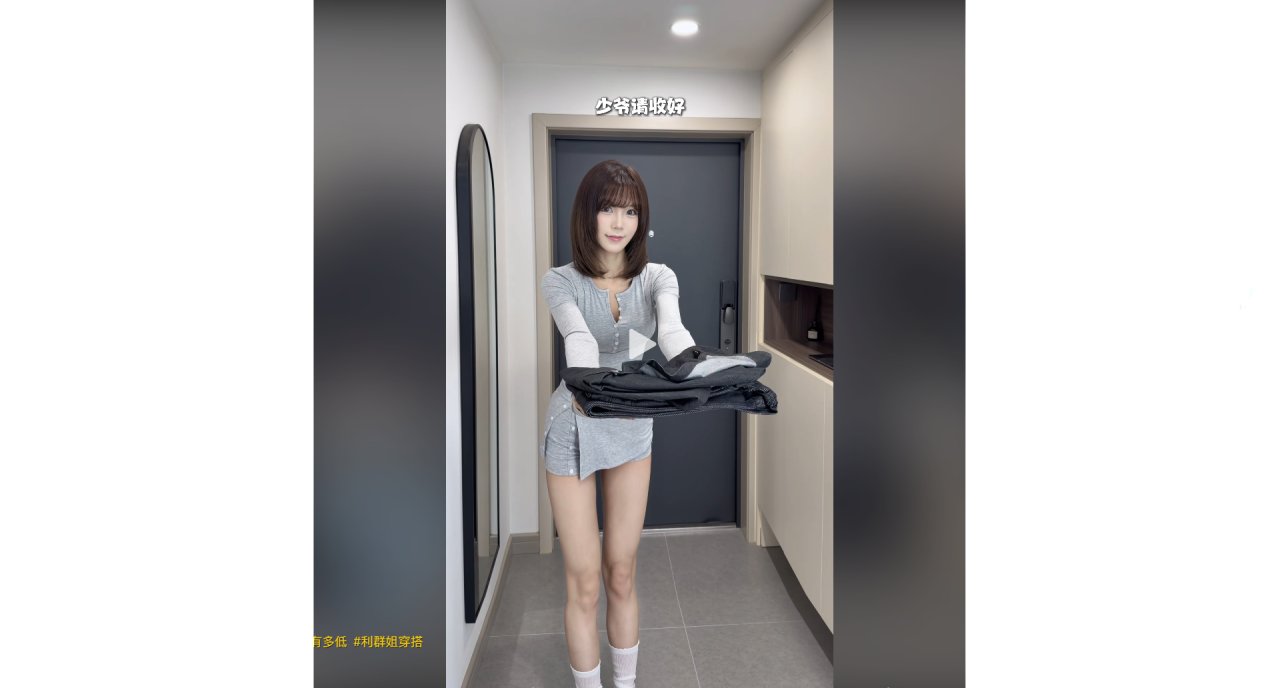
You are standing in your hallway, holding a stack of folded jackets. The scene feels familiar: clean lines, soft lighting, and that specific urge to see how the dark fabric sits on your frame before you commit to the purchase. It is a moment many people experience—wanting to know if a style works without the hassle of trying it on or the risk of a bad fit.
This hesitation is common. Comments often ask for links to specific items, wondering if a hoodie or a leather bag will suit their build. Others worry about size, asking whether to go larger. The desire is simple: visualize the result first.
The Pre-Visualisation Habit
Instead of guessing, some users have started using image-to-image tools to test outfits. The idea is straightforward. You take a photo of yourself in a neutral setting—perhaps similar to the modern entryway described in recent viral clips—and upload it. Then, you apply a template that simulates the jacket you are considering.
In one example, a user uploaded a casual photo and selected a template designed for outerwear. The tool processed the image, swapping the current top for a structured jacket while keeping the background consistent. The output appeared in seconds. This allows for a quick check: does the collar shape look right? Does the color clash with your skin tone?
Steps to Try It Yourself
The process does not require technical knowledge. Here is how it typically unfolds:
| What you do | What you see |
|---|---|
| Select an image-to-image template | A library of outfit styles |
| Upload a clear front-facing photo | Your original image loaded |
| Choose a jacket style from presets | A preview overlay appears |
| Tap generate | A new image renders in seconds |
The key is choosing a photo where your posture is relaxed. If you are holding something, like a stack of clothes, the AI might try to interpret that object as part of the outfit. For best results, start with a simple shot against a plain wall.
Addressing Common Doubts
Many readers express concern about complexity. They assume they need to learn prompt engineering or install software. In reality, the interface is designed for mobile use. There is no deployment step. You do not need to understand what a LoRA model is. You just pick a template and hit go.
Another frequent question is about cost. Users often ask if this saves money. While the tool itself has its own pricing structure, the benefit lies in avoiding expensive mistakes. By visualizing the jacket first, you reduce the chance of buying an item that ends up in a return pile.
When It Might Not Work
It is important to manage expectations. These tools are great for checking general silhouette and color harmony. However, they cannot perfectly replicate fabric texture or weight. A heavy wool coat might look lighter in the generated image than it feels in real life. Also, complex patterns may distort slightly. Use it as a guide, not a guarantee.
If you are looking for precise tailoring details, such as button placement or zipper quality, physical inspection remains necessary. The digital preview helps with the broader stylistic decision, answering the question of "does this look good on me" rather than "is this well-made."
One Small Task
Next time you browse a clothing store app, save a screenshot of a jacket you like. Open your photo editor or a dedicated tool like deepdraw. Find the image-to-image section. Pick a template labeled "outerwear" or "jacket." Upload your selfie. See how the combination looks before adding it to your cart.
This small experiment shifts the focus from impulse buying to informed choice. It turns a static image into a interactive fitting room.
Final Thoughts
The goal is not to replace real-world shopping but to streamline the decision-making process. By testing looks digitally, you can narrow down options quickly. Whether you are concerned about winter warmth or summer style, seeing the result first adds confidence to your final choice.
- 末日短劇最嚇人的不是喪屍,是「末日了還要上班」
- An AI Short Drama Recreated the 1990s Santana — and Viewers Are Arguing About "Face"
- AI短劇拍出了90年代的桑塔納,觀眾吵的卻是面子帳
- 理髮溝通卡正式上線 把想剪的細節整理給理髮師
- AI Hairstyle Try On Is Live Preview a New Style on Your Photo
- 京彩就业 | 般芸聚合秋招校园行:走进菁菁学府,与理想双向奔赴!
- AI 髮型試戴正式上線 先用自己的照片看看新髮型
- Checking Your Winter Layers Before You Freeze
- 爾濱下大雪,南方人穿搭太誇張?用AI試衣先看看上身效果
- How to Check a Jacket Look Before You Buy
全部评论